I sometimes have to stop myself when I say this out loud, but we have been working with WordPress for well over 20 years now. Even writing that feels slightly ridiculous.
When Make Do started working with WordPress, it was still very much seen as a blogging platform by a lot of people. Now it powers everything from simple marketing sites to ecommerce stores, membership platforms, intranets, editorial systems, customer portals and complex web applications.
BloatPress
It is also one of the reasons WordPress sites can become difficult to manage over time. Not because WordPress is bad. Not because plugins are bad. Not because every old site needs throwing away.
Usually, it is because the site has been changed, extended, patched, improved, redesigned, rescued, handed over, updated and worked around for years. At some point, the client starts to feel it.
Before you rebuild your WordPress site, it is worth checking the reliability problems first. The ones I’ve been hearing about for well over a decade still apply today!
The plugin question I still remember
Years ago, I spoke at a WordCamp conference over 10 years ago and the talk was my regular one about plugins.
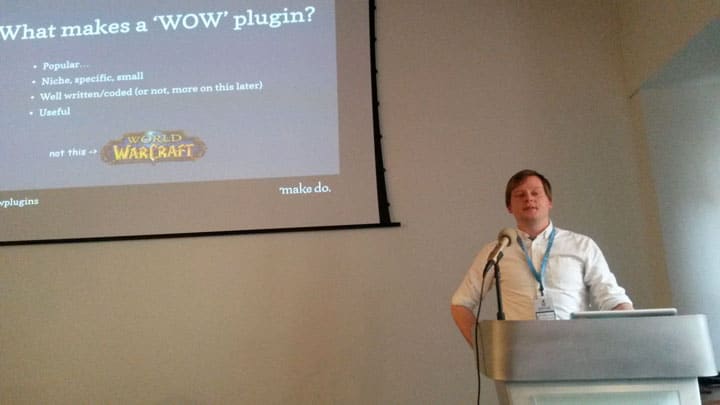
I cannot remember every detail of the talk now, but I do remember one question from the audience because it has followed me around ever since.
“How many plugins should a WordPress site have?“
At the time, I probably answered a bit too naively and jokingly said something like “Ideally, none!” which wasn’t the best promotion for a conference talk ABOUT plugins.
My reasoning back then was that if you had the ability to build a custom theme properly, and if the site had been planned well, then most of the functionality should be intentional. You should not be installing plugins just because they exist. A plugin should serve a specific need.
A contact form plugin is often a perfectly sensible choice. There are reliable ones even back then (RIP Contact Form 7 FYI). They solve a real problem. They are maintained. You do not need to reinvent every wheel just to prove a point.
I recall questions and debate around people were running WooCommerce sites. Some had membership setups. Some had multilingual requirements. Some had payment gateways, email integrations, analytics, search tools, SEO plugins, caching layers, security plugins and all the other things that build up on a real site.
A few people were running sites with 30 or more plugins. We laughed about this, but over a decade later, it seems pretty tame! And that is where the more honest answer sits you see because the number of plugins is not the point.
A WordPress site with 30 plugins is not automatically slow, fragile or badly built just like a WordPress site with five plugins is not automatically clean, fast or reliable.
The real question is whether the plugins have been chosen deliberately, reviewed properly and maintained over time.
Reliability is not about being minimal for the sake of it
There is a certain kind of technical thinking that says a site is only good if it is stripped back to almost nothing. No plugins. No page builder. No extra tools. Everything custom. Everything controlled. That can sound appealing, but, it’s not WordPress. It’s a fantasy.
A standard WordPress site often needs integrations, workflows, editors, forms, custom post types, analytics, consent tools, redirects, search, performance optimisation and all sorts of other moving parts.
A reliable WordPress site is not necessarily a tiny WordPress site. It is a site where the important decisions are known, the risks are understood, and the client can make changes without feeling like they are pulling at loose wiring.
Updates feel scary
This is one of the clearest warning signs that your WP site might be in trouble. If WordPress updates feel like a dramatic event, you need help.
In an ideal situation all updates should be planned, tested and handled with a reasonable amount of confidence. If every update feels dangerous, something underneath needs attention. We’ve had a LOT of clients like this over the years and sometimes a core update and plugin run can take days to get right because you are playing “whack a mole” with the issues that come out the other end.
It might be an old theme. It might be a plugin that has not been maintained properly. It might be custom code that relies on outdated behaviour. It might be an old PHP version. It might be that the site has no reliable staging environment.
This does not automatically mean you need a rebuild however. It just means that you need to understand what is making updates risky.
This is where proper WordPress support and growth plans can make a difference. Ongoing support should not just mean clicking update buttons. It should mean understanding the site well enough to keep it safe, stable and improving.
Small changes are a pain
If a new landing page takes two weeks. A small template change needs three people to check it. A content update needs developer involvement. A campaign idea gets delayed because nobody knows how the page is built.
The site may have been built in a way that made sense at the time, but no longer supports the way the client team works. The editor experience may be too rigid. Templates may be fragile. Blocks may be missing. Fields may appear in strange places. The design system may exist visually, but not operationally.
This is where a lot of redesign conversations begin to start because the client says the site is tired, old, hard to use, yuck. But what they often mean is that the site has become a pain to use.
That is where website and web app development needs to kick in and decide on what a new and “finished” site will function and what it will look like because it still has to support the team after launch and if you end up with the same issues after a rebuild you just wasted a whole lot of time and money on a shiny new site that is still a pain to update.
Plugins and hosting
When reviewing a site for reliability start by looking at the plugins and the hosting. Together these two areas make up 99.9% of all WordPress website problems.
A site can have a lot of plugins and still be reliable if those plugins are understood, maintained and selected for a clear purpose.
A site can also have a small number of plugins and still be fragile if one of them is abandoned, overloaded or central to a critical process nobody understands.
Hosting is often treated as a background detail until it becomes the problem. A bad hosting setup can also hide other problems, because everything feels slow and unstable all the time.
Can the hosting handle the role the site now plays? Are backups tested? Is there staging? Is caching configured properly? Is the site running on supported versions of PHP and WordPress? Is there monitoring? Is anyone looking at logs?
Sometimes the answer is to move hosting or remove plugins or do a bit of both. I’ve seen more quick wins that I can remember by using this approach.
This is why WordPress hosting and migrations should be part of the conversation, not treated as an afterthought.
If a WP site depends on one person or old knowledge
There may be one person who knows how everything works. One guys in IT who remembers why something was done. One freelancer that built a custom feature years ago. One internal team member who knows which plugin cannot be updated or it will break stuff.
That is not a stable long term model and it’s where our WordPress rescue and reliability work begins. The job is not just to fix obvious problems. It is to audit and understand what has been inherited, document what matters, reduce risk and create a clearer route forward.
The wishlist that keeps growing
A growing website wishlist is not always a sign that a team has too many ideas. Sometimes it is a sign that the website cannot absorb change properly because things are too ridged or broken.
Requests build up because everything takes too long. The team starts prioritising around pain instead of value. Important improvements get delayed because urgent fixes keep getting in the way.
The team has lost confidence in the site
This is probably the biggest sign. We see this all the time. It often sounds like this:
“WordPress sucks! Let’s move to [Webflow, NextJS, Squrespace, etc…]”
When people stop trusting the site, they stop trusting in WordPress and everything changes. They will slow down, stop making small improvements, avoid updates, delay campaigns and just work around the CMS instead of using it.
That loss of confidence is difficult to measure, but easy to feel. There is nothing worse than a website that does not ‘website’ and once this frustration sets in, the “rebuild” conversation usually appears.
I’d always push back on this because working out what is actually wrong is a better plan. What can be stabilised? What is worth keeping? What can be removed? What should happen in the next 30, 60 or 90 days?
What It’s Gone Viral taught us about reliability
The It’s Gone Viral project is a good example of this in practice. The site had grown quickly, moving from a large audience to millions of daily visitors. The platform underneath had not been designed for that level of pressure. It relied on outdated WordPress versions, unsupported PHP, an off-the-shelf theme, legacy plugins and code that was becoming increasingly fragile.

The result was serious instability, with the site failing several times a day and in that situation, the first job was not to make the site prettier the first job was to stabilise the business.
That meant reviewing the hosting and infrastructure, moving the site to a custom-configured server environment, reducing downtime and keeping the existing platform alive while a better long-term solution was planned.
The eventual rebuild replaced the old setup with a leaner custom WordPress architecture, introduced Gutenberg block editing, improved the editorial workflow and integrated the advertising systems that supported the commercial model.
Read the full case study here and see how the plan came together, reliability came first, rebuild came months later.
Review before rebuild
A rebuild can be the right answer. But it should not be the first assumption. Before you rebuild your WordPress site, check the reliability problems first.
Book a WordPress 5-Day Reliability Sprint
The WordPress 5-Day Reliability Sprint is designed for this exact situation. It is for teams running existing WordPress sites that have become slow, fragile, risky to update or difficult to improve.
In five focused days, Make Do reviews the current setup, identifies key risks, makes practical fixes where possible and recommends the clearest route forward.
Request WordPress Reliability Sprint
Before you commit to a rebuild, understand what is making your current site hard to trust: Request a Reliability Sprint from Make Do.